How can I edit and share my site for free?
The following article will take you through a step by step example on how to get to editing your site once you have generated one.
-
Start by generating a site using our website builder https://www.mixo.io/start
-
Click Save and Customize to add the site to your account (you may be prompted to login or register at this point)

-
Next, you will see that the site has been added to your account. You can sign up for a paid plan or proceed for free. To proceed for free, simply visit your sites list without upgrading.
-
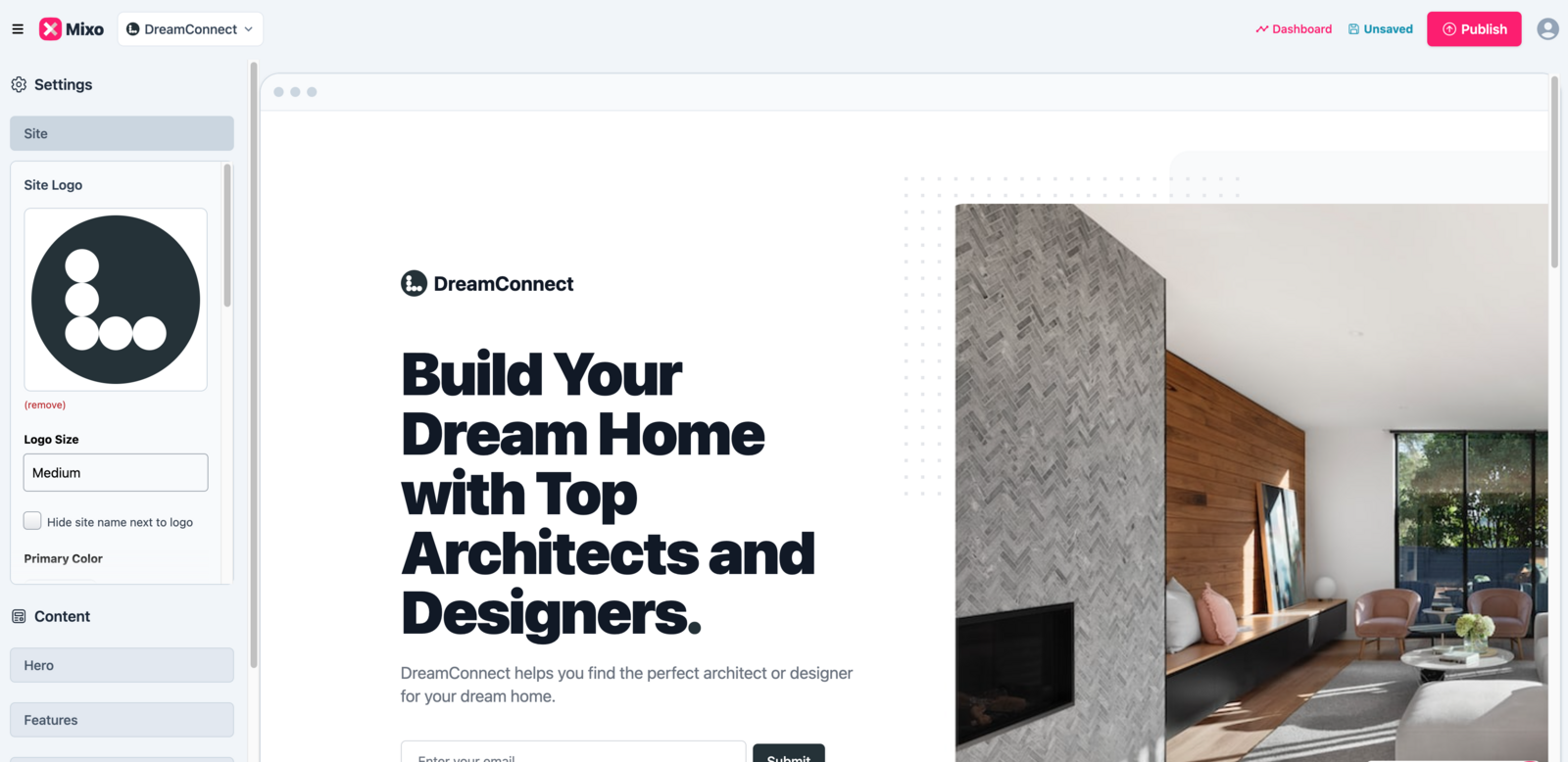
In the editor, you will now have options to edit the content of the site. All content in your site can be edited using the content on the left-hand side menu of the editor. Once you want to push the website live click Publish in the top right corner
-
Once it publishes, your site will be live on a Mixo subdomain (e.g.,
yoursite.mixo.io). You can find your unique URL on the site dashboard. -
After publishing, you’ll see a Share Panel on your dashboard with easy ways to promote your site:
- Share a pre-written message via WhatsApp
- Copy a social media post to announce your site
- Find local groups to share your site in

“I tried three other website builders, and Mixo always came out on top. The interface is easy to understand and simple to use”
Built to work with the tools small businesses already use.
Mixo connects easily with payments, email, analytics and marketing tools so your website actually works for your business.